Practical use and limits
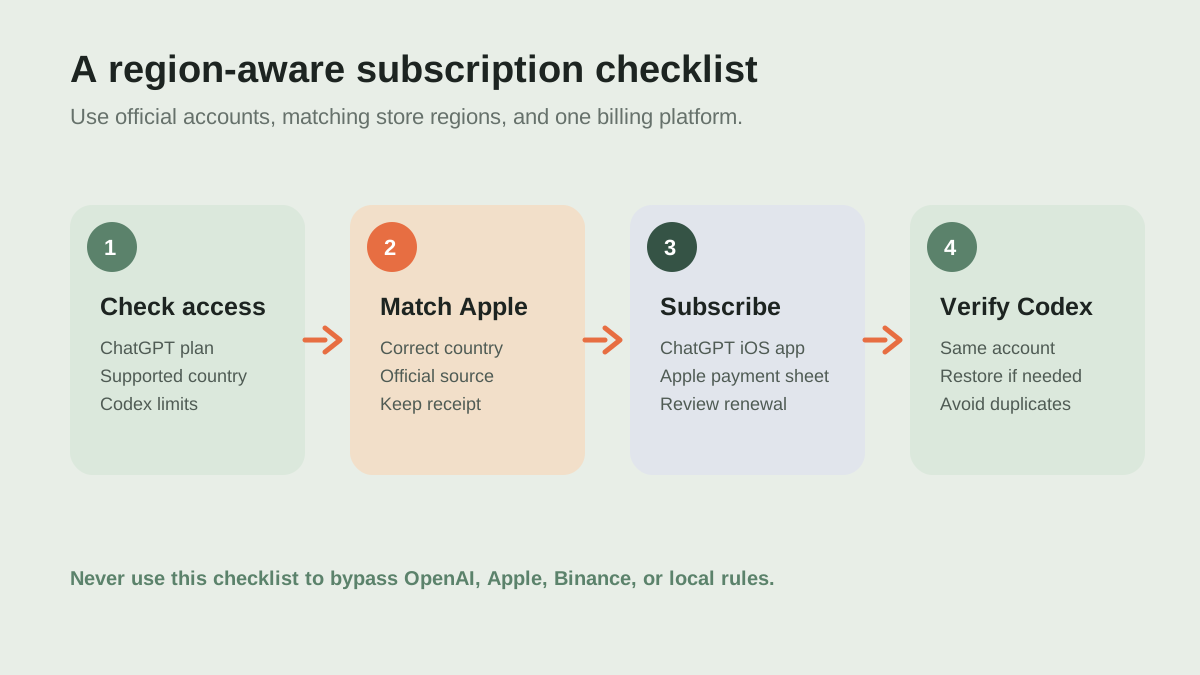
Use it for: Before paying, verify account region, the exact subscription screen, current Codex entitlement, and final Apple amount. Keep the receipt and do not start a second web subscription.
Limits: Apple gift cards and subscriptions are region-specific, prices and entitlements change, and availability depends on the account and country. This does not recommend bypassing regional rules.
Start with eligibility, not payment#
Before buying anything, sign in to the ChatGPT account you actually plan to use with Codex. OpenAI's current Codex help page says Codex is included with eligible ChatGPT plans and that availability and limits vary by plan. The same page currently lists Free, Go, Plus, Pro, Business, Edu, and Enterprise coverage, but product entitlements can change. Check the live plan page and Codex documentation first; you may not need an Apple subscription at all.
The important region and compliance check#
This guide is not a method for bypassing regional availability or payment restrictions. OpenAI says accessing its services from unsupported countries, or using payment methods from unsupported countries, may result in an account being blocked or suspended. Use ChatGPT only where OpenAI supports access, follow local laws, and use an Apple Account whose country or region and payment setup honestly match your circumstances. If those conditions are not true, stop here and use an officially supported route when it becomes available.
About the Binance and Apple gift-card route#
Some users look for Apple gift cards through crypto exchanges or third-party marketplaces. I could not verify a permanent, official Binance Apple gift-card flow from Binance documentation, so availability, seller identity, and local legality must be checked inside your own Binance account. Never send crypto to a private seller, Telegram contact, or unverifiable checkout page. If a gift card is available through a legitimate, authorized channel, buy only the exact country and product type that your Apple Account can redeem, keep the receipt, and treat crypto payments as irreversible until proven otherwise.
Redeem a matching Apple gift card#
Apple's official redemption flow is: open the App Store on your iPhone, tap your account picture, choose Redeem Gift Card or Code, enter or scan the 16-digit code, and tap Redeem. Apple states that US-purchased gift cards and content codes can be linked only to a US account and used for US purchases. A card bought for the wrong store may fail to redeem, and Apple may suspend or void cards or accounts when it suspects fraud or a terms violation. Do not buy an Apple Store hardware card when you need App Store account balance.
Subscribe inside the ChatGPT iOS app#
Install the official ChatGPT app from the App Store and sign in using the same authentication method and account you intend to use with Codex. OpenAI's iOS instructions describe two entry points: tap the Get or upgrade control near the top of the conversation, or open the menu, choose your name, open Settings, and tap Upgrade. Review the plan, currency, renewal terms, and Apple payment sheet before confirming. Apple Account balance may be used for eligible subscriptions, but Apple notes that some purchases can still require a payment method on file.
Verify Codex and keep billing under control#
After Apple confirms the purchase, return to ChatGPT and verify that the plan is attached to the intended account. Then sign in to Codex with that same ChatGPT account. If the plan does not appear, use the app's Restore purchases option and check the Apple receipt before opening support. Do not subscribe again on chatgpt.com while an Apple subscription is still active: OpenAI warns that buying on multiple platforms can create duplicate charges. Apple-managed subscriptions are canceled in iPhone Settings → your name → Subscriptions → ChatGPT.
A safer alternative: subscribe on the web#
If your country and payment method are supported, subscribing at chatgpt.com is often easier to manage across devices. OpenAI specifically recommends the web as the simplest option for people who use ChatGPT on multiple platforms. You can then use the same ChatGPT account with Codex clients such as the app, CLI, IDE extension, or web, subject to the plan's current limits. Choose one billing platform and keep the receipt and renewal date in your records.
Troubleshooting checklist#
If the upgrade button is unavailable, check that the iOS app is official and updated, the Apple Account storefront matches the card, in-app purchases are available for the account, and the correct ChatGPT login is active. If Apple reports a region mismatch, do not repeatedly redeem codes or create accounts to force a result. If payment succeeded but ChatGPT is still on the free plan, wait for the purchase to settle, use Restore purchases, and contact the platform that processed the payment. Keep screenshots and receipts, but never publish gift-card codes or recovery information.
Frequently asked questions
Do I need ChatGPT Plus to use Codex?
Not necessarily. OpenAI's current Codex documentation lists Codex access for multiple ChatGPT plans, including Free for a limited or current offering, with limits varying by plan. Check the live plan and Codex pages before paying.
Can a US Apple gift card be redeemed in any Apple Account?
No. Apple says gift cards are country or region specific. US-purchased cards and content codes are for US accounts and US purchases, and cards from another region cannot be redeemed in the US store.
Should I subscribe on both Apple and the web?
No. Choose one billing platform. OpenAI warns that separate Apple, Google Play, and web subscriptions can result in duplicate charges.